How to Clean a Fan: Complete Guide for All Fan Types

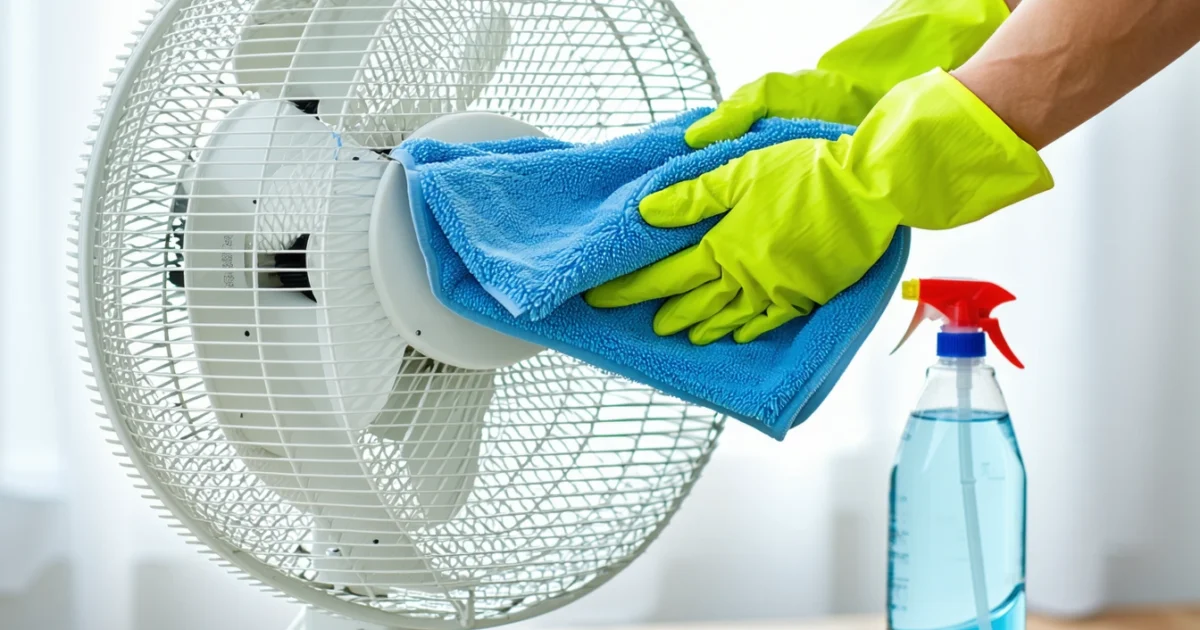
How to clean a fan effectively requires the right techniques and safety precautions to remove dust buildup without damaging electrical components. Whether you’re dealing with a standing fan, tower fan, or ceiling fan, proper cleaning methods can restore airflow performance and extend your fan’s lifespan. Most fans can be cleaned thoroughly without complete disassembly using simple household items and specialized techniques.
Regular fan maintenance prevents dust accumulation that reduces efficiency and creates noise. Furthermore, clean fans circulate fresher air and consume less energy. The key is knowing which cleaning methods work best for different fan types while maintaining electrical safety throughout the process.
This comprehensive guide covers everything from basic safety precautions to advanced cleaning techniques. Additionally, you’ll discover the popular plastic bag method, alternative household cleaning solutions, and maintenance schedules. Whether you’re cleaning extractor fan filters or tackling stubborn dust buildup, these proven methods will help you achieve professional results safely and efficiently.
TL;DR
- Always unplug fans before cleaning and allow complete cooling to prevent electrical shock
- Use the plastic bag method for cleaning without disassembly: insert damp cloth in plastic bag through grille slots
- Essential tools include microfiber cloths, vacuum with brush attachment, and compressed air for thorough cleaning
- Clean every 2-4 weeks with light maintenance and deep clean every 3-6 months for optimal performance
Safety Precautions Before Cleaning Any Fan
Electrical safety forms the foundation of effective fan cleaning. Before touching any fan component, you must unplug the device completely from its power source. This critical step prevents electrical shock and protects both you and the fan’s internal circuitry during cleaning procedures.
Heat dissipation requires patience after extended fan operation. Allow the motor and housing to cool down completely for at least 30 minutes before beginning any cleaning process. Hot components can cause burns and may damage cleaning materials or solutions upon contact.
Critical Safety Warning
Moisture control extends beyond the fan itself to your hands and workspace. Ensure your hands are completely dry before handling any electrical components, switches, or motor housings. Even minimal moisture can conduct electricity through your skin and create dangerous situations.
Workspace preparation significantly impacts cleaning effectiveness and safety outcomes. Work in a well-lit area where you can clearly identify dust accumulation, debris buildup, and potential hazards. Good lighting helps you distinguish between cleanable surfaces and sensitive electrical components that require special handling.
- Unplug the fan from wall outlet or power source
- Wait 30+ minutes for complete cooling after operation
- Dry hands thoroughly before touching any components
- Secure adequate lighting for detailed cleaning work
- Keep liquids away from motor housing and electrical parts
Liquid management prevents costly damage to fan motors and electrical systems. Keep all cleaning liquids away from motor housings, switch mechanisms, and internal wiring. Water damage to these components often requires professional repair or complete fan replacement, making prevention essential.
Professional cleaning services often recommend creating a dedicated workspace for fan maintenance. This approach helps you organize tools, control cleaning solutions, and maintain consistent safety protocols. Moreover, having everything within reach reduces the temptation to rush through safety steps when cleaning multiple fans or extractor fan filters throughout your home.
Emergency preparedness completes your safety foundation before beginning any fan cleaning project. Keep a dry cloth nearby for immediate cleanup of spills, and ensure you know the location of your home’s electrical panel in case of emergencies. These simple preparations create confidence and enable safe, effective fan maintenance.
Essential Cleaning Supplies and Tools
Successful fan cleaning requires the right combination of cleaning supplies and specialized tools that protect delicate components while removing stubborn dust buildup. Professional cleaners emphasize that using inappropriate materials can scratch fan blades, damage protective coatings, or leave residue that attracts more dirt. Therefore, selecting proper equipment ensures both effective cleaning and long-term fan performance.
Core Cleaning Materials
Microfiber cloths serve as the foundation of safe fan cleaning because they trap dust particles without scratching delicate surfaces. Unlike cotton rags or paper towels, microfiber cloths lift dirt through electrostatic attraction rather than abrasive scrubbing. Consequently, these cloths protect painted finishes, plastic components, and metal surfaces from damage during cleaning.
A vacuum cleaner with brush attachment provides initial dust removal from fan grilles, motor housings, and surrounding areas. The brush attachment prevents scratching while creating suction that pulls dust away from hard-to-reach crevices. Furthermore, vacuuming before wet cleaning prevents dust from turning into muddy paste when mixed with cleaning solutions.
Compressed air canisters excel at removing dust from tight spaces between fan blades, motor vents, and electronic components. Professional maintenance technicians use compressed air to blow dust out of areas where cloths and brushes cannot reach. However, always use short bursts to prevent moisture buildup from rapid gas expansion.
Cleaning Solutions and Brushes
Mild dish soap mixed with warm water creates an effective, non-toxic cleaning solution for most fan surfaces. Alternatively, specialized fan cleaning solutions offer enhanced degreasing properties for heavily soiled units. These commercial cleaners often contain surfactants that break down sticky residues while remaining safe for electrical appliances.
A soft-bristled brush or clean old toothbrush enables detailed cleaning of grooved surfaces, screw heads, and textured areas. The bristles reach into surface irregularities where dust accumulates, yet remain gentle enough to avoid scratching. Additionally, dedicated cleaning brushes prevent cross-contamination from bathroom or kitchen use.
Brush Selection Tip
Specialized Cleaning Methods
Plastic bags enable the popular bag cleaning method for ceiling fans and hard-to-reach units. This technique involves placing a plastic bag over each fan blade, spraying cleaning solution inside, and wiping both sides simultaneously. The bag contains drips and debris, preventing mess on floors and furniture below.
WD-40 serves specific applications in fan maintenance, particularly for motor lubrication and removing sticky residues from metal components. However, use WD-40 sparingly and only on designated areas, as overspray can attract dust or damage plastic parts. Professional technicians recommend WD-40 primarily for extractor fan maintenance where grease buildup requires stronger solvents.
| Tool Category | Primary Use | Safety Consideration |
|---|---|---|
| Microfiber cloths | Surface cleaning without scratching | Wash before first use to remove lint |
| Vacuum with brush | Initial dust removal | Use lowest suction setting near delicate parts |
| Compressed air | Hard-to-reach areas | Short bursts only, avoid moisture buildup |
| Soft brushes | Detailed surface cleaning | Test on hidden area first |
| Plastic bags | Mess-free blade cleaning | Secure tightly to prevent dripping |
Quality cleaning supplies make the difference between amateur results and professional-level fan maintenance. Investing in proper tools reduces cleaning time, protects fan components, and delivers consistently excellent results that extend equipment lifespan and improve air circulation efficiency.
How to Clean a Standing Fan Without Disassembling
Cleaning a standing fan without taking it apart requires strategic techniques that work through the protective grille. These methods eliminate dust buildup while preserving the fan’s structural integrity and warranty coverage.
Initial Dust Removal with Vacuum Method
Start your cleaning process by using a vacuum cleaner with brush attachment to remove loose dust particles from the grille and visible blade surfaces. Position the vacuum nozzle approximately 2-3 inches away from the fan components to prevent damage while maintaining effective suction power.
Move the brush attachment systematically across each grille section, working from top to bottom in overlapping strokes. This preliminary step removes approximately 70% of surface dust and prevents debris from spreading during subsequent cleaning phases. Furthermore, the vacuum method proves particularly effective for removing pet hair and fabric fibers that cling to fan blades.
Plastic Bag Cleaning Technique
The plastic bag method represents the most popular approach for cleaning fan blades without disassembly. This technique involves securing a damp microfiber cloth inside a plastic bag, then carefully inserting the bag through the grille slots to access individual blade surfaces.
- Dampen a microfiber cloth with water and mild cleaning solution
- Place the cloth inside a clear plastic bag
- Secure the bag opening tightly around your wrist
- Insert the bagged cloth through grille openings
- Wipe each blade surface thoroughly from base to tip
- Rotate the fan manually to access all blade positions
This method contains drips and debris within the plastic barrier, preventing mess on floors and surrounding furniture. Additionally, the plastic bag technique allows simultaneous cleaning of both blade sides when properly executed.
Individual Blade Cleaning Through Grille
Clean each fan blade individually by working through the grille openings with targeted precision. Use a slightly damp microfiber cloth wrapped around a thin tool like a ruler or wooden spatula to reach blade surfaces that standard cloths cannot access.
Wipe each blade from the motor hub outward to the tip, following the blade’s natural curve. This directional cleaning prevents dust redistribution and ensures thorough coverage of all blade surfaces. Rotate the fan manually between each blade cleaning to maintain consistent access angles.
Motor Housing and External Component Care
Clean the motor housing exterior using a slightly damp microfiber cloth, avoiding excessive moisture that could penetrate internal components. Focus on removing dust accumulation from ventilation slots, control panels, and base connections where debris commonly collects.
Wipe the fan base, adjustment knobs, and power cord connections with appropriate cleaning solutions. These external surfaces require regular attention since they contact hands and floors frequently, accumulating oils and environmental contaminants that affect fan appearance and hygiene.
Compressed Air for Deep Cleaning
Use compressed air to blow dust from motor vents and internal components that cloth cleaning cannot reach effectively. Hold the compressed air canister upright and use short, controlled bursts to prevent moisture condensation inside the motor housing.
Direct the air stream through grille openings at various angles to dislodge embedded dust particles from blade crevices and motor cooling fins. This technique proves especially valuable for fans operating in dusty environments or homes with pets. However, perform compressed air cleaning outdoors or in well-ventilated areas to prevent dust clouds from settling on nearby surfaces.
Safety Reminder
Manual Blade Rotation for Complete Access
Rotate fan blades manually during the cleaning process to access all surfaces systematically. Turn the blades slowly and deliberately, pausing at each position to clean the newly exposed areas thoroughly before continuing to the next section.
This rotation technique ensures comprehensive cleaning coverage while maintaining control over the cleaning process. Mark your starting position mentally or with a small piece of tape to avoid missing sections or over-cleaning specific areas. Complete rotation cleaning typically requires 3-4 position changes for optimal results.
The Plastic Bag Cleaning Method Explained
The plastic bag cleaning technique revolutionises fan maintenance by providing safe access to fan blades without disassembling the unit. This innovative method combines the cleaning power of microfiber cloths with the protective barrier of a plastic bag, enabling thorough blade cleaning while safeguarding your hands from sharp edges and electrical components.
Begin by selecting a damp microfiber cloth and placing it inside a clean plastic bag, ensuring the cloth remains accessible through the bag opening. The moisture level should be sufficient to capture dust particles without creating dripping water that could damage electrical components. Subsequently, insert the bagged cloth through the grille openings to reach individual fan blades directly.
Step-by-Step Plastic Bag Application
- Position the damp microfiber cloth inside the plastic bag opening
- Insert your hand into the bag while gripping the cloth firmly
- Thread the bagged cloth through grille spaces to contact blade surfaces
- Wipe each blade systematically from base to tip
- Rotate the fan manually to access all blade positions
- Rinse and replace the cloth as dirt accumulates
The plastic bag serves as a protective barrier that prevents direct hand contact with potentially sharp blade edges while maintaining complete control over cleaning pressure and direction. Moreover, this barrier prevents oils from your skin transferring to cleaned surfaces, ensuring a streak-free finish on blade surfaces.
Wipe each blade surface thoroughly using firm, consistent strokes that follow the blade’s natural curve from hub to tip. The microfiber material captures dust particles effectively while the plastic bag contains loose debris, preventing it from falling into the motor housing or spreading throughout the room.
Accessing Front and Back Blade Surfaces
This method excels at reaching both front and back blade surfaces without requiring fan disassembly or removal from mounting positions. Insert the bagged cloth from different angles through grille openings to contact the rear blade surfaces that typically accumulate the most dust buildup.
Rotate the fan manually between cleaning sessions to systematically access all blade positions and ensure comprehensive coverage. The plastic bag’s flexibility allows it to conform to various grille shapes and sizes, making this technique suitable for different fan types including extractor fans and standing units.
Rinse the microfiber cloth regularly during the cleaning process to maintain its effectiveness, wringing out excess water before placing it back in a fresh plastic bag. This prevents cross-contamination and ensures optimal cleaning performance throughout the entire maintenance session.
Pro Tip
Cleaning Different Types of Fans
Different fan types require specific cleaning approaches that account for their unique design features and accessibility challenges. Understanding these variations ensures effective dust removal while preventing damage to delicate components and maintaining optimal airflow performance.
Tower Fans: Vertical Cleaning Strategy
Tower fans present unique cleaning challenges due to their vertical design and narrow air intake grilles. Focus cleaning efforts on the intake grilles located along the front panel, where dust accumulates most heavily and restricts airflow efficiency.
Use compressed air to blast dust from internal components through the grille openings, working from top to bottom in systematic sections. This technique dislodges embedded particles from the internal fan assembly without requiring complete disassembly of the unit.
Clean the output grilles using a vacuum cleaner with brush attachment, then follow with a damp microfiber cloth to remove remaining residue. The narrow spacing between grille slats requires careful attention to ensure complete dust removal from all surfaces.
Ceiling Fans: Overhead Cleaning Techniques
Ceiling fans require specialised cleaning methods due to their elevated position and large blade span. An extendable duster with telescoping handle provides safe access to blade surfaces without requiring ladder use or precarious positioning.
The pillowcase method offers superior dust containment for ceiling fan cleaning. Slide a pillowcase over each blade, then wipe from hub to tip while the fabric captures falling debris inside the case.
This technique prevents dust from falling onto furniture and flooring below while ensuring thorough cleaning of both blade surfaces simultaneously. Replace pillowcases between blades to prevent cross-contamination and maintain cleaning effectiveness throughout the process.
Portable Desk Fans: Disassembly Cleaning
Portable desk fans often feature removable grilles and accessible internal components that allow for thorough cleaning through partial disassembly. Check the manufacturer’s instructions before attempting any disassembly to avoid voiding warranties or causing damage.
Remove the front grille by unclipping or unscrewing the securing mechanism, then clean the fan blades directly with warm soapy water. This direct access enables complete removal of accumulated dust and grime that compressed air alone cannot eliminate.
Clean the grille components separately in a sink using a soft brush to scrub between slats and remove embedded particles. Ensure all components dry completely before reassembly to prevent moisture damage to electrical components.
Bladeless Fans: Airflow Path Focus
Bladeless fans concentrate dust accumulation in the air intake areas at the base of the unit, where the internal impeller draws air through filters and chambers. These areas require focused cleaning attention to maintain optimal performance.
Use compressed air to clear dust from intake vents, then vacuum the base area thoroughly to remove dislodged particles. The smooth exterior surfaces respond well to simple wiping with a damp microfiber cloth, requiring minimal effort compared to traditional blade cleaning.
Pay special attention to the air multiplier ring where dust can accumulate in the narrow gap that creates the airflow effect. A cotton swab dampened with cleaning solution effectively removes buildup from these precise areas.
Industrial Fans: Professional Cleaning Requirements
Industrial fans typically require professional cleaning services due to their substantial size, complex mounting systems, and safety considerations. These units often operate in challenging environments that create heavy dust accumulation requiring specialised equipment and expertise.
Professional technicians possess the proper safety equipment and cleaning tools necessary to access large industrial fan assemblies safely. Additionally, they understand the specific maintenance requirements for different industrial fan types, ensuring compliance with safety regulations and manufacturer specifications.
However, basic maintenance like cleaning extractor fan filters can often be performed in-house using appropriate safety precautions and following manufacturer guidelines. Regular filter maintenance extends the intervals between professional deep cleaning sessions and maintains optimal airflow efficiency.
Deep Cleaning When Disassembly Is Possible
Disassembling your fan unlocks the most thorough cleaning approach, allowing access to every component for comprehensive dust removal. This method proves particularly effective for standing fans and pedestal fans where accumulated grime affects both performance and air quality. However, complete disassembly requires careful attention to safety protocols and manufacturer specifications.
Safe Grille Removal Process
Begin by unplugging the fan completely from its power source, then consult your owner’s manual to identify the specific grille removal method for your model. Most fans feature either plastic clips around the perimeter or screws securing the front guard. Consequently, removing these fasteners requires gentle pressure to avoid damaging the mounting points.
Plastic clips typically release with a gentle squeeze and pull motion, while screw-mounted grilles require appropriate screwdriver sizes to prevent stripping. Furthermore, some manufacturers use a combination of clips and screws, making manual consultation essential for proper disassembly.
Thorough Grille Cleaning Method
Once removed, the front grille benefits from complete immersion cleaning using warm soapy water and a soft-bristled brush. This approach effectively removes embedded dust particles that resist surface wiping methods. Additionally, the wire spacing allows thorough scrubbing without damaging the protective coating.
- Submerge grille in warm water with mild dish soap
- Scrub each wire intersection with a soft brush
- Rinse thoroughly under running water
- Shake excess water and air dry completely
Complete drying prevents rust formation on metal components and eliminates moisture that could damage electrical systems during reassembly. Therefore, allow at least 2-3 hours of air drying time before proceeding with fan reconstruction.
Individual Blade Cleaning Technique
With the grille removed, each fan blade becomes accessible for detailed cleaning using a damp microfiber cloth and mild cleaning solution. This individual attention removes the layered dust buildup that affects aerodynamic efficiency and creates noise during operation. Moreover, cleaning each blade separately ensures uniform dust removal across the entire assembly.
Work systematically from the blade root near the motor hub outward to the tip, maintaining consistent pressure to avoid bending the blade structure. Similarly, clean both the upper and lower surfaces of each blade, as dust accumulates on all exposed surfaces regardless of rotation direction.
Pro Cleaning Tip
Motor Housing Maintenance
The motor housing exterior requires careful cleaning with a slightly damp cloth, avoiding any contact with electrical components or ventilation openings. Focus cleaning efforts on the visible surfaces where dust accumulation affects heat dissipation and overall appearance. However, never allow moisture to penetrate the motor casing or electrical connections.
Use cotton swabs for detailed cleaning around control switches, speed selectors, and oscillation mechanisms where dust commonly accumulates. These precision tools allow thorough cleaning without risking damage to delicate electrical components or moving parts.
Reassembly and Testing Protocol
Reassemble the fan only after confirming complete dryness of all cleaned components, as residual moisture can cause electrical hazards or component corrosion. Begin by securing the front grille using the reverse of the removal process, ensuring all clips engage properly or screws tighten to manufacturer specifications.
Test the fan operation at low speed initially to verify proper reassembly and normal function before returning to regular use. Listen for unusual noises that might indicate loose components or improper alignment during the cleaning process. Additionally, check that oscillation and speed controls function normally after reassembly.
This comprehensive disassembly cleaning method provides the most effective dust removal possible, extending fan life and maintaining optimal air circulation performance. Regular deep cleaning using this approach prevents the heavy buildup that necessitates more frequent maintenance cycles.
Alternative Cleaning Methods and Household Items
Household items offer effective alternatives to commercial cleaning products when maintaining your fan. These readily available solutions tackle specific cleaning challenges while providing cost-effective maintenance options for regular upkeep.
Baking Soda Paste for Stubborn Grime
Baking soda paste creates a gentle abrasive solution that removes stubborn grime from fan blades and grilles without scratching surfaces. Mix three parts baking soda with one part water to form a thick paste consistency. This alkaline compound breaks down grease and accumulated dirt effectively.
Apply the paste using a soft brush or cloth, working in circular motions to lift embedded dirt particles. The mild abrasive action removes buildup that standard wiping cannot eliminate. Furthermore, baking soda neutralises odours naturally, leaving your fan components fresh and clean.
White Vinegar Solution for Mineral Deposits
White vinegar dissolves mineral deposits and eliminates odours through its acidic properties. Create a cleaning solution using equal parts white vinegar and water for effective yet safe cleaning power. This natural acid breaks down calcium and lime buildup that accumulates over time.
Spray the vinegar solution onto affected areas and allow it to sit for five minutes before wiping clean. The acetic acid penetrates mineral deposits, making removal effortless with minimal scrubbing required. Additionally, vinegar’s antimicrobial properties eliminate bacteria and mould that might develop in humid conditions.
Toothpaste as Mild Abrasive
Non-gel toothpaste serves as an excellent mild abrasive for cleaning plastic fan components, particularly effective on yellowed or stained surfaces. The fine abrasive particles in toothpaste remove surface discolouration without causing damage to plastic materials.
Apply a small amount directly to the surface and work with a damp cloth using gentle circular motions. However, rinse thoroughly with clean water after cleaning to remove all toothpaste residue, as leftover product can attract dust and dirt.
Important Safety Note
Dryer Sheets for Anti-Static Protection
Dryer sheets provide dual benefits during fan cleaning by removing existing dust while creating an anti-static barrier that repels future accumulation. The fabric softening agents in dryer sheets reduce static electricity that attracts airborne particles to fan surfaces.
Wipe fan blades and grilles with a used dryer sheet after regular cleaning to apply the anti-static coating. This protective layer significantly extends the time between cleaning sessions. Moreover, dryer sheets leave a pleasant fragrance that freshens the air circulation.
Compressed Air Alternatives
Several household alternatives effectively replace expensive compressed air cans for dust removal. A hair dryer on cool setting provides controlled airflow for blowing dust from hard-to-reach areas without the cost of commercial compressed air products.
Position the hair dryer at least six inches from fan components to prevent damage from excessive force. The cool air setting prevents heat damage while providing sufficient pressure to dislodge accumulated dust particles.
Alternatively, a manual air pump designed for inflating sports equipment offers precise control for targeted dust removal. These pumps generate consistent pressure without the environmental concerns associated with aerosol cans. Similarly, bicycle pumps with appropriate attachments can provide effective dust removal capabilities.
For those interested in maintaining other household items with similar care, cleaning extractor fan filters requires comparable attention to detail and proper technique.
Pros
- Cost-effective using common household items
- Environmentally friendly alternatives to chemicals
- Multi-purpose solutions for various cleaning tasks
- Readily available without special shopping trips
Cons
- May require more time than commercial products
- Some methods need thorough rinsing to prevent residue
- Results may vary depending on dirt severity
- Testing required to ensure material compatibility
Maintenance Schedule and Prevention Tips
Establishing a consistent maintenance routine prevents dust accumulation while extending your fan’s operational lifespan. Regular cleaning schedules reduce the effort required for each session and maintain optimal airflow performance throughout the year.
Light Cleaning Frequency
Light cleaning every 2-4 weeks maintains fan performance in most household environments. However, usage patterns and environmental factors significantly influence this schedule. Fans operating continuously in dusty environments require cleaning every two weeks, while occasional-use fans in clean spaces extend to four-week intervals.
Kitchen fans accumulate grease particles faster than bedroom units, necessitating more frequent attention. Similarly, homes with pets generate additional hair and dander that accelerates dust buildup on fan surfaces. Monitor your specific environment to establish the optimal cleaning frequency.
Deep Cleaning Requirements
Deep cleaning every 3-6 months addresses accumulated debris that light cleaning cannot remove. Performance indicators signal when deep cleaning becomes necessary, regardless of the scheduled timeline. Reduced airflow, increased noise levels, or visible dust buildup on internal components indicate immediate deep cleaning requirements.
Seasonal transitions provide ideal timing for comprehensive fan maintenance. Spring cleaning removes winter dust accumulation, while autumn preparation ensures optimal performance during heating season operation. Document cleaning dates to track patterns and adjust schedules accordingly.
Environmental Dust Control
Regular dusting of surrounding areas dramatically reduces fan dust accumulation by eliminating source particles before circulation spreads them throughout the room. Focus on surfaces within three feet of fan placement, including furniture tops, windowsills, and decorative items that collect airborne particles.
Weekly dusting routines prevent particle redistribution during fan operation. Use microfiber cloths to capture rather than disperse dust particles. Additionally, vacuum carpeted areas regularly, as floor-level dust becomes airborne through foot traffic and fan circulation.
Air Filter Maintenance
Check and clean air filters in rooms where fans operate to reduce overall dust circulation throughout your home. HVAC system filters trap particles before they reach individual room fans, significantly extending cleaning intervals. Replace or clean these filters monthly during peak usage seasons.
Room air purifiers complement fan maintenance by continuously removing airborne particles. Position these units strategically to create clean air zones around frequently used fans. This combination approach reduces both cleaning frequency and effort required for maintenance.
Performance Monitoring
Monitor fan performance indicators to determine cleaning needs before efficiency drops significantly. Reduced airflow serves as the primary indicator that cleaning intervention is required. Test airflow by holding tissue paper near the fan at various distances to gauge circulation strength.
- Increased operational noise indicates bearing strain from dust accumulation
- Wobbling or vibration suggests uneven dust distribution on blades
- Longer startup times signal motor stress from debris buildup
- Musty odours indicate moisture trapped in dust layers
Document these observations to establish baseline performance metrics for your specific fan models. Early intervention prevents minor issues from developing into costly repairs or premature replacement needs.
Seasonal Storage Practices
Store seasonal fans in dust-free environments to prevent accumulation during inactive periods. Clean fans thoroughly before storage to remove all dust and moisture that could attract pests or cause corrosion during extended dormancy.
Wrap fans in breathable cloth covers rather than plastic bags, which trap moisture and promote mould growth. Choose storage locations with stable temperature and humidity levels, avoiding basements, attics, or garages prone to extreme conditions. Proper storage practices ensure fans remain ready for immediate use when seasons change.
Pro Maintenance Tip
Troubleshooting Common Cleaning Issues
Even careful cleaning can present challenges that require specific solutions. Therefore, understanding how to address common issues ensures your fan maintenance efforts achieve optimal results. Most cleaning problems stem from improper technique or inadequate preparation rather than equipment failure.
Stubborn Dust Buildup Solutions
Stubborn dust accumulation requires increased moisture and gentle scrubbing techniques to break down compacted particles. Apply slightly more cleaning solution to the microfibre cloth, ensuring it remains damp rather than soaking wet. Additionally, allow the moisture to penetrate the dust layer for 30-60 seconds before attempting removal.
Gentle circular motions work more effectively than aggressive scrubbing for removing hardened dust deposits. Furthermore, multiple light passes prove more successful than single heavy-pressure attempts. This approach prevents damage to delicate fan components while achieving thorough cleaning results.
Grease and Sticky Residue Removal
Grease or sticky residue requires degreasing dish soap solutions to break down oil-based contaminants effectively. Mix one teaspoon of dish soap with warm water to create a powerful degreasing agent. This solution cuts through kitchen grease that accumulates on fans near cooking areas.
Apply the degreasing solution with a soft cloth, working in small sections to prevent oversaturation. Subsequently, rinse the area with a clean, damp cloth to remove soap residue that could attract future dirt accumulation. Dry thoroughly to prevent water spots or streaking on fan surfaces.
Motor Noise After Cleaning
Motor noise after cleaning typically indicates moisture remains in electrical components, creating operational interference. Ensure complete drying of all motor housing areas before reconnecting power to prevent electrical damage. Use a hairdryer on cool setting to accelerate drying in hard-to-reach motor compartments.
Wait 24 hours minimum before operating recently cleaned fans to guarantee complete moisture evaporation. Moreover, check that no cleaning solution has penetrated motor seals or bearing assemblies. Persistent noise after thorough drying requires professional inspection to prevent motor damage.
Performance Issues After Cleaning
Reduced performance often results from missed dust in motor vents or blade imbalance caused by uneven cleaning. Inspect motor ventilation slots for remaining debris that restricts airflow to cooling systems. Use compressed air to clear stubborn particles from inaccessible vent areas.
Check blade balance by examining each blade for equal cleanliness and weight distribution. Uneven dust removal creates wobbling that reduces efficiency and increases wear on motor bearings. Clean all blades to identical standards to maintain proper balance and smooth operation.
Safety Warning
Electrical Problems and Professional Help
Electrical issues require professional consultation if problems persist after proper cleaning and drying procedures. Symptoms include intermittent operation, unusual sparking, burning odours, or complete failure to start. These indicators suggest internal damage that exceeds basic maintenance capabilities.
Document specific symptoms and cleaning procedures performed before contacting repair services. This information helps technicians diagnose issues more efficiently and determine whether problems relate to cleaning damage or pre-existing conditions. Professional assessment ensures safe resolution of complex electrical problems.
Consider replacement costs versus repair expenses for older fans experiencing multiple issues after cleaning. Sometimes, thorough cleaning reveals underlying problems that make replacement more economical than extensive repairs. Proper filter maintenance in kitchen exhaust fans can prevent similar issues in other household ventilation systems.
Prevention Strategies
Implement regular maintenance schedules to prevent most cleaning complications before they develop. Weekly dusting prevents heavy accumulation that requires aggressive cleaning techniques. Monthly deep cleaning maintains optimal performance without risking moisture damage from infrequent intensive sessions.
Use appropriate tools and solutions for specific fan types to avoid compatibility issues. Ceiling fans require different approaches than desktop models due to accessibility and motor design differences. Understanding these distinctions prevents cleaning-related damage and ensures effective maintenance outcomes.
Frequently Asked Questions
How do you clean dust out of a fan?
To clean dust out of a fan, first unplug the device and let it cool for 30 minutes. Use a vacuum with brush attachment to remove loose dust, then wipe blades with a microfiber cloth. For deeper cleaning, use the plastic bag method: insert a damp cloth in a plastic bag and thread it through the grille slots to clean each blade individually.
How do you clean a fan without taking it apart?
The plastic bag method is the most effective way to clean a fan without disassembly. Place a damp microfiber cloth inside a plastic bag, then carefully insert the bag through the grille slots to wrap around each blade. This technique allows thorough cleaning while keeping the fan assembled and protecting electrical components from moisture.
How to clean a standing fan without opening it?
Clean a standing fan without opening by using compressed air to blow out dust, followed by the plastic bag technique for blade cleaning. Use a vacuum with brush attachment on the grille and housing. For stubborn dust, spray a cloth with cleaning solution and carefully wipe accessible surfaces through the grille openings.
Can you clean fan blades with water?
You can clean fan blades with water, but never apply water directly to the fan. Instead, dampen a cloth with water (not soaking wet) and use the plastic bag method to clean each blade. Always ensure the fan is unplugged and completely dry before reconnecting to power to prevent electrical damage.
How to clean a tower fan without disassembling?
Tower fans can be cleaned using compressed air blown through the intake and exhaust vents, followed by vacuuming with a brush attachment. Use long, thin cleaning tools or pipe cleaners to reach internal components through vent openings. The plastic bag method works well for accessible blade areas in tower fan designs.
What is the plastic bag method for cleaning fans?
The plastic bag method involves placing a damp microfiber cloth inside a plastic bag, then inserting the bag through fan grille slots to wrap around each blade. This technique allows you to clean both sides of fan blades simultaneously while protecting the motor and electrical components from moisture exposure.
How often should you clean your fan?
Clean fans every 2-4 weeks with light maintenance like dusting and vacuuming. Perform deep cleaning every 3-6 months using thorough methods like the plastic bag technique. Fans in dusty environments or heavy-use areas may require more frequent cleaning to maintain optimal airflow and efficiency.
Can you use WD-40 to clean a standing fan?
Avoid using WD-40 for cleaning fan blades as it’s a lubricant, not a cleaner, and can attract more dust. Instead, use mild soap solutions, vinegar mixtures, or specialized electronics cleaners. WD-40 should only be used sparingly on motor bearings if specifically recommended by the manufacturer.
How to clean a ceiling fan without a ladder?
Clean ceiling fans without a ladder using extendable dusting tools with microfiber attachments, or a long-handled mop with a pillowcase secured over the head. The pillowcase method allows you to slide it over each blade to trap dust. Always ensure the fan is off and use slow, controlled movements to avoid damage.
What household items can clean fan blades effectively?
- Microfiber cloths for dust removal and polishing
- White vinegar solution (1:1 with water) for cutting through grime
- Baking soda paste for stubborn buildup
- Compressed air for blowing out dust from tight spaces
- Vacuum with brush attachment for initial dust removal
Is it safe to use toothpaste to clean fan blades?
While some people use toothpaste as an abrasive cleaner, it’s not recommended for fan blades. Toothpaste can leave residue that attracts dust and may damage blade finishes. Stick to proven methods like mild soap solutions, vinegar mixtures, or specialized cleaners designed for electronics and appliances.
How do you clean extractor fan filters?
Remove extractor fan filters according to manufacturer instructions, then soak in warm soapy water for 15-20 minutes. Scrub gently with a soft brush to remove grease and debris. Rinse thoroughly and allow to air dry completely before reinstalling. Some filters are dishwasher-safe on the top rack.
What tools are essential for fan cleaning?
- Microfiber cloths for effective dust capture
- Vacuum with brush attachment for initial cleaning
- Compressed air canister for hard-to-reach areas
- Plastic bags for the no-disassembly cleaning method
- Mild cleaning solutions (soap, vinegar, or electronics cleaner)
- Soft-bristled brush for detailed cleaning
Why does my fan get dusty so quickly after cleaning?
Fans attract dust quickly due to static electricity generated by spinning blades and airflow patterns that draw particles from the surrounding air. To reduce dust accumulation, use anti-static sprays after cleaning, maintain proper room humidity (30-50%), and ensure regular air filter changes in your HVAC system to reduce airborne particles.
You May Also Like
How to Clean a Sink Drain: Complete Step-by-Step Guide

How to Deep Clean Your Kitchen: Complete Step-by-Step Guide