How to Clean TV Screen Safely: Complete Guide 2026

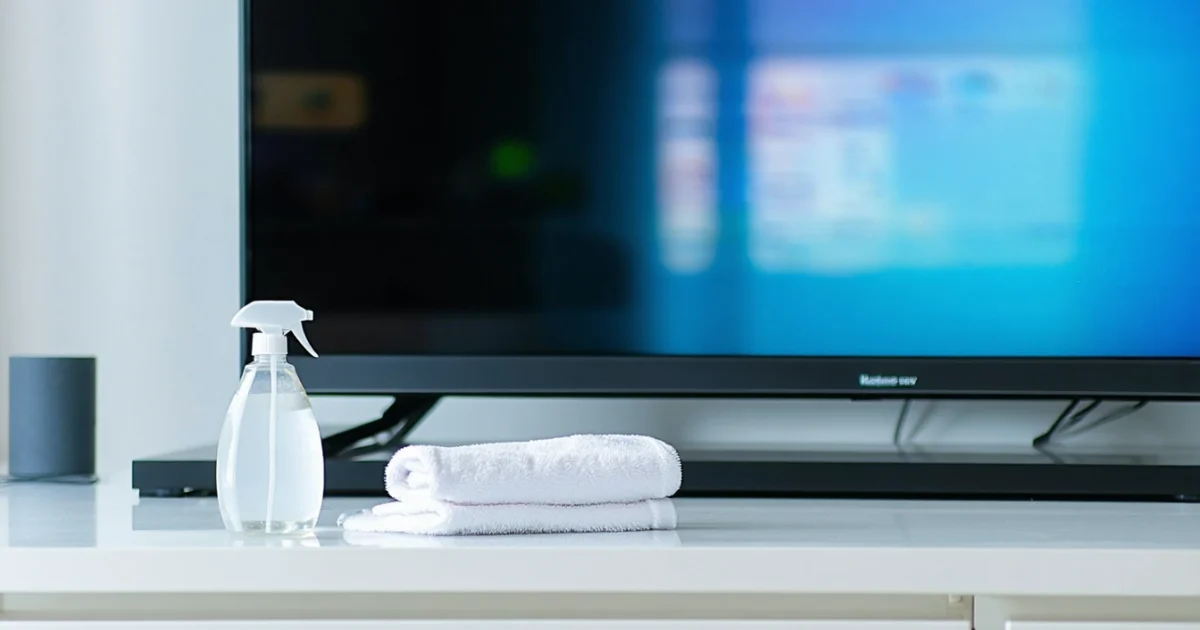
Learning how to clean TV screen properly protects your investment and ensures crystal-clear viewing quality. Modern television screens require specific cleaning methods to avoid permanent damage to delicate anti-glare coatings and LCD panels. Using the wrong materials or techniques can create scratches, streaks, or costly screen damage that manufacturers won’t cover under warranty.
Most importantly, never use glass cleaners or paper towels on your TV screen. Instead, you’ll need microfibre cloths, distilled water, and gentle cleaning solutions. The process involves turning off your television, allowing it to cool completely, then using proper wiping techniques to remove dust, fingerprints, and smudges safely.
Different screen types like OLED, QLED, and LED displays require slightly different approaches. Additionally, establishing a regular cleaning schedule prevents stubborn stains and keeps your screen looking pristine. Similar to cleaning windows without streaks, the key lies in using the right materials and technique.
TL;DR
- Always turn off and unplug your TV before cleaning, allowing it to cool completely
- Use only microfibre cloths with distilled water or isopropyl alcohol solutions – never glass cleaners or paper towels
- Clean gently in circular motions without pressure, and establish a regular maintenance schedule to prevent stubborn stains
Essential Preparation Before Cleaning Your TV Screen
Proper preparation prevents costly screen damage and ensures effective cleaning results. Television screens contain delicate components that generate heat during operation, making immediate cleaning dangerous for both you and your device. Furthermore, powered screens create static electricity that attracts dust particles, making thorough cleaning nearly impossible.
Power Down and Disconnect Your Television
Turn off your TV completely using the power button, then unplug the device from the mains socket. Simply using the remote control leaves your television in standby mode, which maintains electrical current through sensitive components. Additionally, unplugging eliminates any risk of electrical shock during the cleaning process.
Most modern televisions continue drawing power even when appearing “off” to maintain smart features and quick startup times. Therefore, physical disconnection ensures complete safety and allows internal components to discharge residual electricity properly.
Allow Adequate Cooling Time
Television screens require 15-30 minutes cooling time after switching off, depending on usage duration and screen size. Hot screens expand slightly, making them more vulnerable to pressure damage during cleaning. Moreover, cleaning solutions evaporate too quickly on warm surfaces, creating streaks and residue.
Touch the screen gently with your fingertip to check temperature – it should feel completely cool before proceeding. Larger screens like 65-inch models retain heat longer than smaller displays, so adjust cooling time accordingly.
Gather Your Cleaning Materials
Collect microfibre cloths, distilled water, and isopropyl alcohol before starting the cleaning process. Microfibre cloths lift dust particles without scratching delicate screen coatings, whilst distilled water prevents mineral deposits that tap water leaves behind. Similarly to cleaning windows without streaks, using proper materials makes the difference between professional and amateur results.
- Two clean microfibre cloths – one for cleaning, one for drying
- Distilled water in a spray bottle
- 70% isopropyl alcohol for stubborn marks (optional)
- Cotton swabs for cleaning around bezels and corners
Never use paper towels, tissues, or household cleaning products on TV screens. These materials contain wood fibres that scratch anti-glare coatings permanently, whilst chemical cleaners dissolve protective screen treatments.
Check Manufacturer Guidelines
Television manufacturers provide specific cleaning instructions in user manuals that override general advice. Samsung, LG, Sony, and other brands use different screen technologies requiring tailored cleaning approaches. Consequently, checking your manual prevents warranty voiding and ensures optimal results.
Locate your TV model number (usually found on the back panel or in settings menu) to access online manuals if your physical copy is missing. Some manufacturers explicitly prohibit certain cleaning solutions or techniques that could damage their proprietary screen coatings.
OLED screens require gentler cleaning than LED displays due to their organic compound construction
Document any existing screen damage before cleaning to avoid confusion later. Take photos of scratches, dead pixels, or discolouration that existed prior to your cleaning session, protecting yourself from potential warranty disputes.
Safe Cleaning Materials and What to Avoid
Choosing appropriate cleaning materials determines whether you achieve professional results or permanently damage your television screen. Modern TV displays feature delicate anti-glare coatings that harsh chemicals and abrasive materials destroy irreversibly. Therefore, understanding which products clean safely and which ones cause damage protects your investment whilst ensuring optimal viewing quality.
Recommended Safe Cleaning Materials
Microfibre cloths represent the gold standard for TV screen cleaning because their ultra-fine synthetic fibres lift dust and grime without scratching surfaces. Additionally, these cloths trap particles within their weave rather than pushing debris across the screen. Use two separate microfibre cloths – one for cleaning and another for drying – to prevent recontamination during the process.
Distilled water provides the safest cleaning solution for most TV screens since it contains no minerals or chemicals that leave residues. Furthermore, distilled water evaporates cleanly without streaking, unlike tap water which contains calcium and magnesium deposits. Mix distilled water with 70% isopropyl alcohol in a 1:1 ratio for stubborn fingerprints and smudges, but test this solution on an inconspicuous area first.
Cotton swabs dipped in distilled water effectively clean around bezels, buttons, and corners where cloths cannot reach. Similarly, these precision tools remove accumulated dust from speaker grilles and ventilation ports without applying excessive pressure to sensitive components.
Materials That Damage TV Screens
Paper towels and tissues contain wood fibres that scratch anti-glare coatings permanently, creating microscopic grooves that scatter light and reduce image clarity. Moreover, these materials often leave lint particles on screens that attract more dust and dirt. Even premium paper products marketed as “soft” or “lint-free” pose risks to delicate screen surfaces.
Glass cleaners designed for windows contain ammonia and other harsh chemicals that dissolve protective screen coatings on modern televisions. Similarly, window cleaning products formulated for traditional glass surfaces prove too aggressive for TV displays. These cleaners strip away anti-reflective treatments that manufacturers apply to reduce glare and improve viewing angles.
Ammonia-based products cause immediate and irreversible damage to OLED, QLED, and LCD screens by breaking down organic compounds and polymer layers. Additionally, furniture polish, kitchen degreasers, and bathroom cleaners contain solvents that permanently cloud or discolour screen surfaces.
Why Modern TV Screens Are Vulnerable
Contemporary television screens feature multiple microscopic layers including anti-glare coatings, anti-reflective treatments, and oleophobic surfaces that repel fingerprints. However, these protective layers measure only nanometres thick, making them extremely susceptible to chemical and physical damage. Once damaged, these coatings cannot be repaired or replaced without professional screen replacement.
OLED displays prove particularly vulnerable because their organic light-emitting compounds degrade when exposed to harsh chemicals or excessive moisture. Meanwhile, quantum dot displays contain nanocrystals that alcohol concentrations above 70% can damage permanently. Even traditional LCD screens suffer coating degradation from inappropriate cleaning products.
Understanding these vulnerabilities explains why manufacturers void warranties when customers use prohibited cleaning materials. Consequently, investing in proper cleaning supplies costs significantly less than replacing damaged screens or losing warranty coverage through improper maintenance practices.
Step-by-Step TV Screen Cleaning Method
Following the correct sequence prevents damage whilst ensuring thorough cleaning results. This systematic approach addresses dust removal, solution application, and final inspection through proven techniques that protect delicate screen coatings.
Initial Dry Dusting Process
Begin cleaning by removing loose dust particles using a clean microfibre cloth designed specifically for electronics. Furthermore, this preliminary dusting prevents scratching when moisture gets applied later. Gently wipe the entire screen surface using straight horizontal movements from left to right.
Never use paper towels, tissues, or cotton cloths during this stage because these materials contain wood fibres that scratch screen surfaces. Instead, choose lint-free microfibre cloths that trap dust particles within their microscopic fibres. Additionally, ensure your cloth remains completely dry throughout this initial cleaning phase.
Preparing Homemade Cleaning Solution
Create an effective cleaning mixture using equal parts distilled water and isopropyl alcohol at 70% concentration or lower. Specifically, combine 50ml distilled water with 50ml isopropyl alcohol in a clean spray bottle. This solution effectively removes fingerprints, smudges, and stubborn marks without damaging protective coatings.
Distilled water prevents mineral deposits that tap water leaves behind on screen surfaces. Meanwhile, isopropyl alcohol evaporates quickly, reducing streak formation whilst providing antimicrobial properties. However, concentrations above 70% can damage quantum dot displays and OLED screens permanently.
Proper Application Technique
Spray the cleaning solution onto your microfibre cloth rather than directly onto the screen surface. This controlled application prevents liquid from seeping into screen edges where it can cause electrical damage. Subsequently, ensure the cloth feels slightly damp but never saturated with cleaning solution.
Clean the screen using gentle circular motions with minimal pressure applied. Start from the centre and work outwards in overlapping circles, covering the entire display systematically. Avoid pressing firmly because excessive pressure can damage LCD crystals or OLED pixels permanently.
Similar to cleaning windows without streaks, maintaining consistent motion patterns prevents uneven cleaning results. Moreover, circular movements distribute the cleaning solution evenly whilst lifting away oils and residues effectively.
Drying and Final Inspection
Allow the screen to air dry completely before conducting your final inspection. Typically, isopropyl alcohol evaporates within 30 to 60 seconds under normal room conditions. However, avoid turning on your television until the screen appears completely dry to prevent electrical issues.
Inspect the cleaned surface under different lighting conditions to identify any remaining streaks or residue. If streaks appear, repeat the cleaning process using less solution on your cloth. Additionally, examine screen edges where dust and cleaning solution commonly accumulate during the cleaning process.
Complete your inspection by viewing the screen from multiple angles to ensure uniform cleanliness. Any remaining marks or streaks indicate insufficient cleaning or excessive moisture application. Consequently, addressing these issues immediately prevents them from becoming permanent stains or damage.
Cleaning Different TV Screen Types
Different television technologies require specific cleaning approaches to prevent damage and maintain optimal performance. Understanding your TV screen type ensures you apply the correct cleaning method whilst avoiding costly repairs or permanent display damage.
LCD and LED Screen Specific Considerations
LCD displays contain liquid crystals sandwiched between polarising filters, making them particularly sensitive to pressure and harsh chemicals. Similarly, LED televisions use LCD technology with LED backlighting, requiring identical care protocols during cleaning procedures.
Never apply pressure directly to LCD or LED screens because excessive force can create permanent dead pixels or crystal damage. Instead, use feather-light touches with your microfibre cloth, allowing the cleaning solution to perform the actual cleaning work. Furthermore, avoid ammonia-based products entirely as these chemicals can dissolve the anti-reflective coatings commonly found on these displays.
Temperature considerations prove crucial for LCD screen cleaning success. Clean your television when it reaches room temperature, typically 30 minutes after switching off. Hot screens can cause cleaning solutions to evaporate too quickly, leaving streaks and residue behind.
OLED Display Cleaning Precautions
OLED screens represent the most delicate television technology available, with each pixel containing organic compounds that emit light independently. Consequently, these displays require the gentlest cleaning approach to preserve their self-illuminating properties and prevent burn-in issues.
Use only distilled water or isopropyl alcohol solutions below 50% concentration on OLED displays. Higher alcohol concentrations can damage the organic compounds within individual pixels, leading to permanent colour shifts or dead pixels. Additionally, never use circular motions on OLED screens; instead, employ straight, overlapping strokes from top to bottom.
OLED cleaning frequency should remain minimal due to the screen’s sensitivity. Clean only when visible dirt or fingerprints appear, as excessive cleaning can accelerate organic compound degradation over time.
QLED and Premium Display Care
QLED televisions utilise quantum dot technology with enhanced colour reproduction capabilities, requiring specific care to maintain their premium performance standards. These displays typically feature additional protective coatings that demand gentle cleaning approaches similar to streak-free window cleaning techniques.
Premium displays often incorporate anti-glare coatings and colour enhancement filters that can be damaged by inappropriate cleaning methods. Use only manufacturer-recommended cleaning solutions or create your own using one part distilled water to one part isopropyl alcohol. Moreover, always test any cleaning solution on a small, inconspicuous area first.
High-end television screens may include additional features like blue light filters or enhanced contrast coatings. These specialised layers require extra caution during cleaning, as damage to these coatings can significantly impact picture quality and colour accuracy.
Smart TV Touchscreen Cleaning
Some smart televisions incorporate touchscreen functionality, creating additional cleaning challenges due to frequent finger contact and oil accumulation. These interactive displays require more frequent cleaning whilst demanding extra care to preserve touch sensitivity.
Clean touchscreen TVs using the same gentle techniques as mobile devices, employing slightly dampened microfibre cloths with minimal cleaning solution. However, ensure complete drying before use, as residual moisture can interfere with touch recognition capabilities and create false inputs.
Disable touch functionality during cleaning to prevent accidental inputs or menu changes. Most smart TVs include a cleaning mode or screen lock feature specifically designed for maintenance purposes. Additionally, clean touchscreen displays more frequently than traditional screens due to increased oil and fingerprint accumulation from regular interaction.
Removing Stubborn Marks and Stains
Even with careful maintenance, television screens accumulate stubborn marks that resist standard cleaning methods. Furthermore, different types of stains require specific removal techniques to avoid permanent damage to delicate screen surfaces.
Dealing with Fingerprints and Smudges Safely
Fingerprints contain natural oils that bond to screen surfaces, creating persistent smudges that worsen over time. Consequently, removing these marks requires gentle persistence rather than aggressive scrubbing that damages anti-glare coatings.
Apply distilled water to a microfibre cloth using circular motions, starting from the centre of each fingerprint and working outward. Subsequently, use a dry section of the cloth to buff away any remaining moisture streaks. This technique prevents oil redistribution across the screen surface.
For particularly stubborn fingerprints, create a solution using 70% isopropyl alcohol mixed with equal parts distilled water. However, test this mixture on an inconspicuous corner first, as some screen coatings react poorly to alcohol-based cleaners.
Removing Sticky Residue Without Damage
Adhesive residue from stickers or tape creates challenging removal situations that require careful approaches. Moreover, aggressive scraping damages screen surfaces permanently, making gentle dissolution methods essential.
Begin removal by applying warm distilled water to soften the adhesive, allowing natural loosening over several minutes. Then, use plastic cards or credit cards to gently lift edges without applying direct pressure to the screen surface.
For resistant residue, apply small amounts of white vinegar using cotton swabs, targeting only the affected areas. Additionally, commercial adhesive removers designed for electronics provide safe alternatives, though always verify compatibility with your specific television model first.
Addressing Water Spots and Mineral Deposits
Hard water creates mineral deposits that appear as white spots or cloudy patches on television screens. Similarly, these calcium and magnesium buildups require acidic solutions to dissolve effectively without scratching delicate surfaces.
Create a cleaning solution using one part white vinegar to three parts distilled water for mineral deposit removal. Apply this mixture sparingly using cotton swabs, focusing only on affected areas to prevent unnecessary exposure of clean screen sections.
Rinse treated areas immediately with distilled water to neutralise acidic residue, then dry thoroughly using clean microfibre cloths. This process mirrors techniques used for cleaning windows without streaks, ensuring crystal-clear results.
Never use tap water for final rinsing, as mineral content creates new deposits during drying
When to Seek Professional Cleaning Services
Certain cleaning situations exceed safe DIY capabilities, requiring professional intervention to prevent costly screen damage. Therefore, recognising these scenarios protects your investment whilst ensuring optimal display performance.
Contact professional services when dealing with internal moisture damage, cracked screens, or extensive coating deterioration. Additionally, high-value televisions exceeding £2,000 warrant professional maintenance to preserve warranty coverage and specialised coating integrity.
Commercial cleaning services possess specialised equipment including anti-static solutions, precision applicators, and controlled environment facilities. Furthermore, these professionals understand manufacturer-specific requirements for different screen technologies and coating types.
Schedule professional cleaning annually for premium televisions or when standard methods fail to achieve satisfactory results. Most importantly, never attempt repairs on damaged screens yourself, as improper handling can void warranties and create safety hazards.
Maintenance Schedule and Prevention Tips
Establishing a proper maintenance schedule prevents dirt accumulation whilst extending your television’s lifespan significantly. Moreover, consistent cleaning routines reduce the need for intensive treatments that risk damaging delicate screen coatings.
How Often to Clean Your TV Screen
Clean your television screen weekly for optimal viewing clarity, adjusting frequency based on household conditions and usage patterns. However, high-traffic homes with children or pets require bi-weekly cleaning to maintain pristine display quality.
Dust accumulation occurs daily, creating a gradual film that reduces brightness and colour accuracy over time. Therefore, light dusting every 3-4 days prevents heavy buildup whilst minimising cleaning time required during weekly sessions.
| Household Type | Cleaning Frequency | Dusting Frequency |
|---|---|---|
| Single adults | Bi-weekly | Weekly |
| Families with children | Weekly | Every 3-4 days |
| Pet owners | Weekly | Every 2-3 days |
| High-dust environments | Twice weekly | Daily |
Intensive cleaning sessions should occur monthly, addressing stubborn marks and performing thorough maintenance checks. Similarly, seasonal deep cleans coincide with spring and autumn cleaning schedules, ensuring comprehensive care throughout the year.
Daily Habits to Keep Screens Cleaner Longer
Simple preventive measures dramatically reduce cleaning frequency whilst maintaining optimal screen clarity between scheduled maintenance sessions. Furthermore, these habits protect expensive electronics from damage caused by accumulated contaminants.
- Turn off televisions before cleaning to prevent static electricity attracting additional dust particles
- Avoid touching screens directly, using remote controls and voice commands instead
- Close curtains during peak sunlight hours to reduce heat-related dust circulation
- Maintain proper ventilation around electronics to prevent moisture accumulation
Position televisions away from high-traffic areas where airborne particles concentrate, reducing dust exposure significantly. Additionally, regular vacuuming of surrounding furniture prevents dust redistribution onto clean screen surfaces.
Keep eating and drinking away from viewing areas, as food particles and beverage spills create stubborn stains requiring intensive cleaning methods. This approach mirrors the careful maintenance required for streak-free window cleaning, where prevention proves more effective than correction.
Environmental Factors Affecting Screen Cleanliness
Understanding environmental influences helps predict cleaning needs whilst adapting maintenance schedules to specific household conditions. Consequently, targeted approaches prove more effective than generic cleaning routines.
Humidity levels directly impact dust adhesion, with high moisture content causing particles to stick more tenaciously to screen surfaces. Therefore, homes exceeding 60% relative humidity require more frequent cleaning to maintain optimal clarity.
Air circulation patterns distribute contaminants throughout living spaces, with stagnant air allowing particles to settle on horizontal and vertical surfaces equally. However, proper ventilation systems reduce particle concentration whilst improving overall air quality around electronic equipment.
Cooking activities increase airborne grease particles by 300% within 6 metres of kitchen areas
Seasonal changes affect cleaning requirements, with winter heating systems creating dry conditions that increase static electricity and dust attraction. Conversely, summer humidity promotes bacterial growth and requires more frequent antimicrobial treatments.
Geographic location influences dust composition, with coastal areas experiencing salt deposits whilst urban environments face pollution-related contamination. These factors necessitate specialised cleaning approaches similar to those used for double glazed window maintenance.
Screen Protector Options and Maintenance
Screen protectors provide an additional barrier against scratches, fingerprints, and environmental contaminants whilst simplifying cleaning procedures. Moreover, these protective films cost significantly less than screen replacements when damage occurs.
Tempered glass protectors offer superior durability and optical clarity, maintaining original display quality whilst providing excellent scratch resistance. However, these protectors require careful installation to prevent air bubbles that compromise visual performance.
Anti-glare films reduce reflections in bright environments but slightly diminish colour vibrancy and sharpness. Therefore, these protectors suit rooms with significant natural light exposure where glare creates viewing difficulties.
- Privacy screens limit viewing angles whilst protecting against scratches
- Blue light filters reduce eye strain during extended viewing sessions
- Antimicrobial coatings prevent bacterial growth on frequently touched surfaces
- Oleophobic treatments repel fingerprints and reduce cleaning frequency
Clean screen protectors using identical methods applied to bare screens, ensuring gentle pressure prevents delamination or bubble formation. Additionally, inspect protector edges monthly for lifting or damage that compromises protective effectiveness.
Replace damaged protectors immediately to prevent contaminants reaching the actual screen surface underneath. This preventive approach ensures long-term screen integrity whilst maintaining optimal viewing quality throughout your television’s operational lifespan.
Frequently Asked Questions
Can I use glass cleaner on my TV screen?
No, never use glass cleaner on TV screens. Glass cleaners contain ammonia and other harsh chemicals that can permanently damage anti-glare coatings and LCD panels. These chemicals can dissolve protective screen treatments and void your warranty. Always use distilled water or approved screen cleaning solutions instead.
What's the best cloth to clean my TV screen with?
Microfibre cloths are the only safe option for cleaning TV screens. They lift dust particles without scratching delicate coatings. Never use paper towels, tissues, or regular cloths as these contain wood fibres that can permanently scratch your screen. Keep two clean microfibre cloths – one for cleaning and one for drying.
How long should I wait before cleaning my TV after turning it off?
Wait 15-30 minutes after turning off your TV before cleaning. Hot screens are more vulnerable to pressure damage, and cleaning solutions evaporate too quickly on warm surfaces, creating streaks. Larger screens like 65-inch models retain heat longer, so adjust cooling time accordingly. Touch the screen gently – it should feel completely cool.
Should I use tap water or distilled water for cleaning?
Always use distilled water for cleaning TV screens. Tap water contains minerals that leave deposits and streaks on your screen after drying. Distilled water evaporates cleanly without residue, ensuring a crystal-clear finish. You can purchase distilled water from most supermarkets in the UK.
Is it safe to spray cleaning solution directly onto the TV screen?
Never spray directly onto the screen. Liquid can seep into edges and damage internal components. Instead, spray the cleaning solution onto your microfibre cloth first, then gently wipe the screen. This prevents excess moisture from entering the TV and gives you better control over the cleaning process.
How often should I clean my TV screen?
Clean your TV screen weekly for regular use or whenever you notice dust, fingerprints, or smudges. Establishing a regular cleaning schedule prevents stubborn stains from building up. If you have children or pets, you may need to clean more frequently. Light dusting can be done more often, whilst deep cleaning should be limited to prevent wear on screen coatings.
Can I use isopropyl alcohol on all TV screen types?
Use 70% isopropyl alcohol sparingly and only for stubborn marks. Different screen types (OLED, QLED, LED) may have varying tolerances to alcohol. Always check your manufacturer’s guidelines first, as some brands specifically advise against alcohol use. When in doubt, stick to distilled water for regular cleaning.
What should I do if I've already damaged my screen with the wrong cleaner?
If you’ve used glass cleaner or harsh chemicals, stop immediately and assess the damage. Minor streaking may be reversible with proper cleaning techniques, but dissolved anti-glare coatings cannot be repaired. Contact your manufacturer’s customer service for advice, though warranty coverage is unlikely for cleaning damage. Prevention is always better than attempting repairs.
You May Also Like
How to Stop Sediment in Washing Machine Drums: UK Guide 2026
How to Clean Glass Stovetop: Complete UK Guide 2026